One of four products in one stack. The same page structure on all four, so comparing them is reading rather than hunting.
ForgeTerminal
The trading terminal your clients use, on web and as an installable mobile app, built by us rather than licensed from a platform vendor.
What it removes.
A third-party platform licence, and everything that follows from one: a per-seat fee that grows with your success, a roadmap owned by someone else, and a support path that ends at a vendor who does not know your business. When a client reports a problem, the people who wrote the terminal are the people who answer.
Capabilities.
- 01
MQL expert advisors run unchanged
Upload the same file your clients already use. No transpiling step, no rewrite, and no conversation about which subset is supported.
- 02
Familiar order handling
The order ticket, chart interaction, one-click trading and depth window follow MetaTrader conventions. Retraining an existing book is measured in minutes.
- 03
Web and installable mobile
One codebase serving a browser and a PWA your clients install from their phone. No app-store review sitting between you and a fix.
- 04
Full API surface
Web, Manager and Gateway APIs are available, so tooling you already built against MT keeps its shape. Integrations are ported, not rebuilt.
- 05
Your branding, not ours
The terminal carries your name, your palette and your domain. Nothing in what a client sees advertises us.
The claim is one system. This is where it is either true or not.
How it connects to the rest of the stack.
Not "integrates with" — there is nothing between these to integrate. Each line below names what actually crosses, and what does not have to happen as a result.
- ForgeTerminal ForgeQuote
- Prices reach the terminal from your own engine, not from a vendor feed you cannot inspect or adjust.
- ForgeTerminal ForgeCRM
- A client opens the terminal with the account, group and leverage the CRM holds. There is no sync step and no reconciliation window.
- ForgeTerminal ForgeRails
- Deposits appear as tradable balance without a batch job. The ledger the terminal reads is the ledger payments write to.
Technical detail.
| Deployment | Managed on our infrastructure, per-client isolated database. |
|---|---|
| APIs | Web API, Manager API, Gateway API. REST and WebSocket. |
| Expert advisors | MQL4 and MQL5, executed server-side. |
| Mobile | Installable PWA. No app-store dependency. |
| Documentation | See the Resources section — link in the footer. |
Interface.
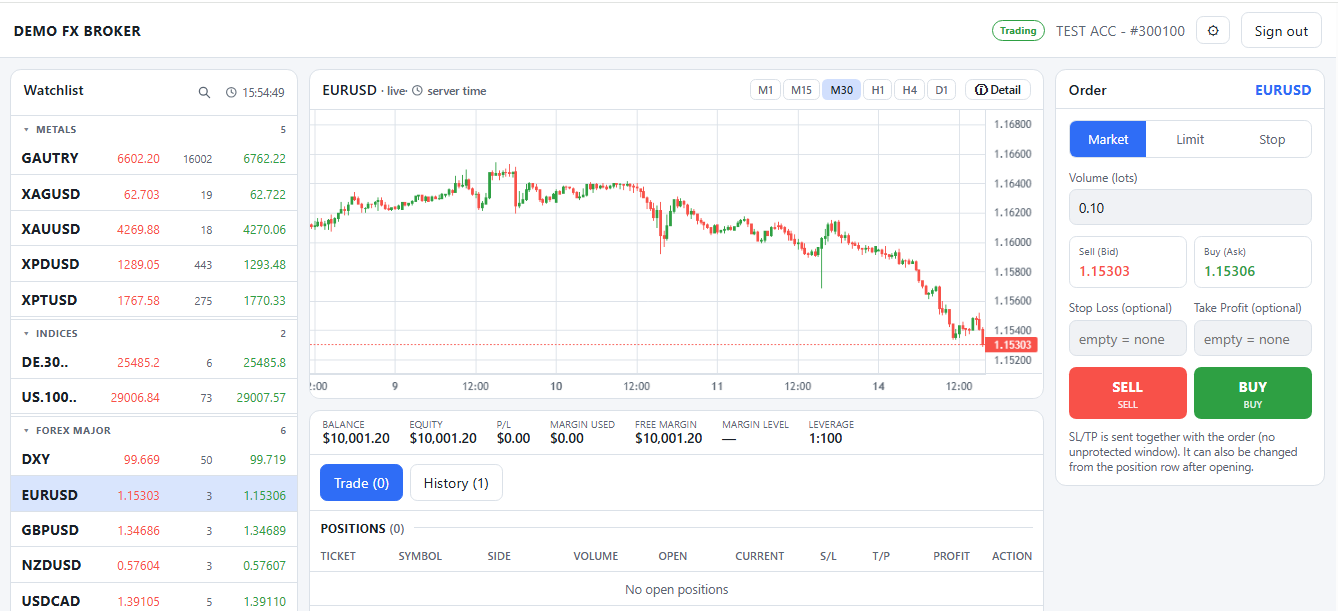
- The watchlist carries a bid AND an ask on every row, not a single mid price. The spread is the number a trader checks first, so it is not something to open a second panel for.
- Timeframes run M1 to D1 on the chart itself. The interaction follows MetaTrader conventions deliberately — retraining an existing book is the cost nobody budgets for.
- Market, limit and stop in one panel, with stop loss and take profit fields sitting beside the volume rather than behind a second step.
- Balance, equity, margin used, free margin, margin level and leverage on one strip. A trader working out whether they can hold a position should not have to compute it.
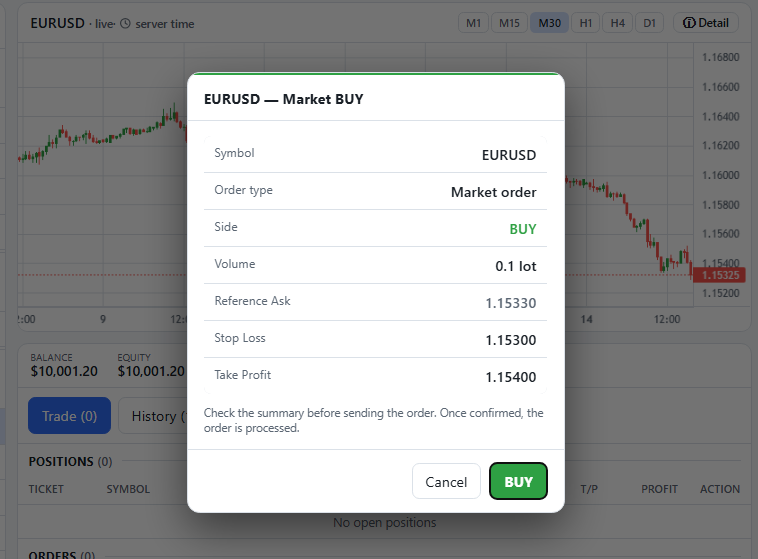
- The reference ask is shown before you confirm, so the price the order is measured against is on screen rather than inferred from the ticket you just left.
- Stop loss and take profit travel WITH the order. There is no window between the fill and the protection being attached — which is the window a gap through a news release opens into.
- One confirmation, and the summary above it is the whole order. Nothing is added on the server after you press this.
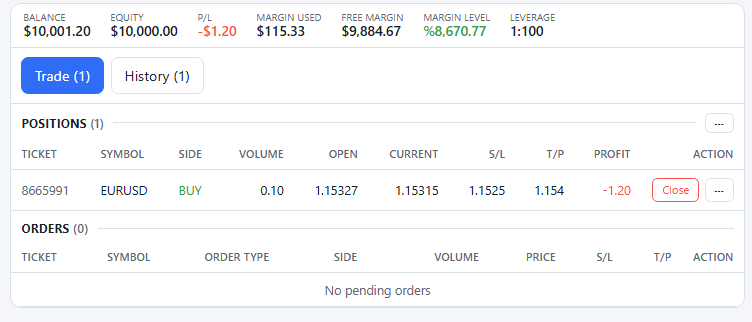
- Margin level updates against the live price, not on a refresh. It is the number that decides whether a position survives the next move, so it is never a stale one.
- The stop and the target sit on the position row and are editable there. Protection that can only be set at entry is protection you stop adjusting.
- Closing is one action from the row, with a summary before it commits.
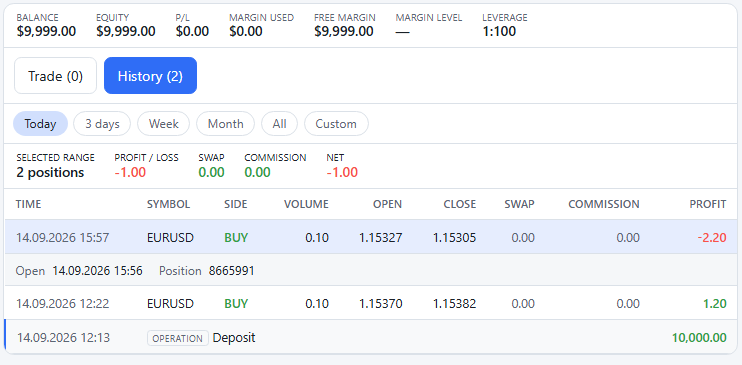
- Ranges from today to a custom window. A broker answering a client question about last Tuesday should not be exporting a file to do it.
- Swap and commission are columns, not a figure netted into the profit. A client disputing a charge can see the charge.
- The deposit sits in the same record as the trades. This is the payment layer and the terminal reading one ledger rather than two systems being reconciled — the connection named above, visible.
Questions that come up.
Not written yet. This section is for the three or four questions that actually come up in sales calls. Those have to come from someone who has sat in them — inventing plausible-sounding questions would produce a section that answers nothing a real buyer asked. If you have one, it is the question worth asking in the demo.
5open items on this page
- Mobile captures: the installable app on a phone. The page claims web and mobile from one codebase and only the web half is shown.
- A short interface video. Nothing on the site handles one yet — no player, no poster frame, no captions.
- Chart engine details: which indicator set ships, whether custom indicators are supported.
- Supported languages for the client interface at launch.
- FAQ — needs the questions that actually come up in sales calls, from someone who has sat in them.
Listed because a page that hides what it does not know is the thing this audience is checking for. Figures among these will each need their measurement definition before they can appear — see execution transparency.
See it before you decide.
ForgeTerminal is not sold separately. The demo gives you the whole stack, because that is the only way to check whether the connections above are real.